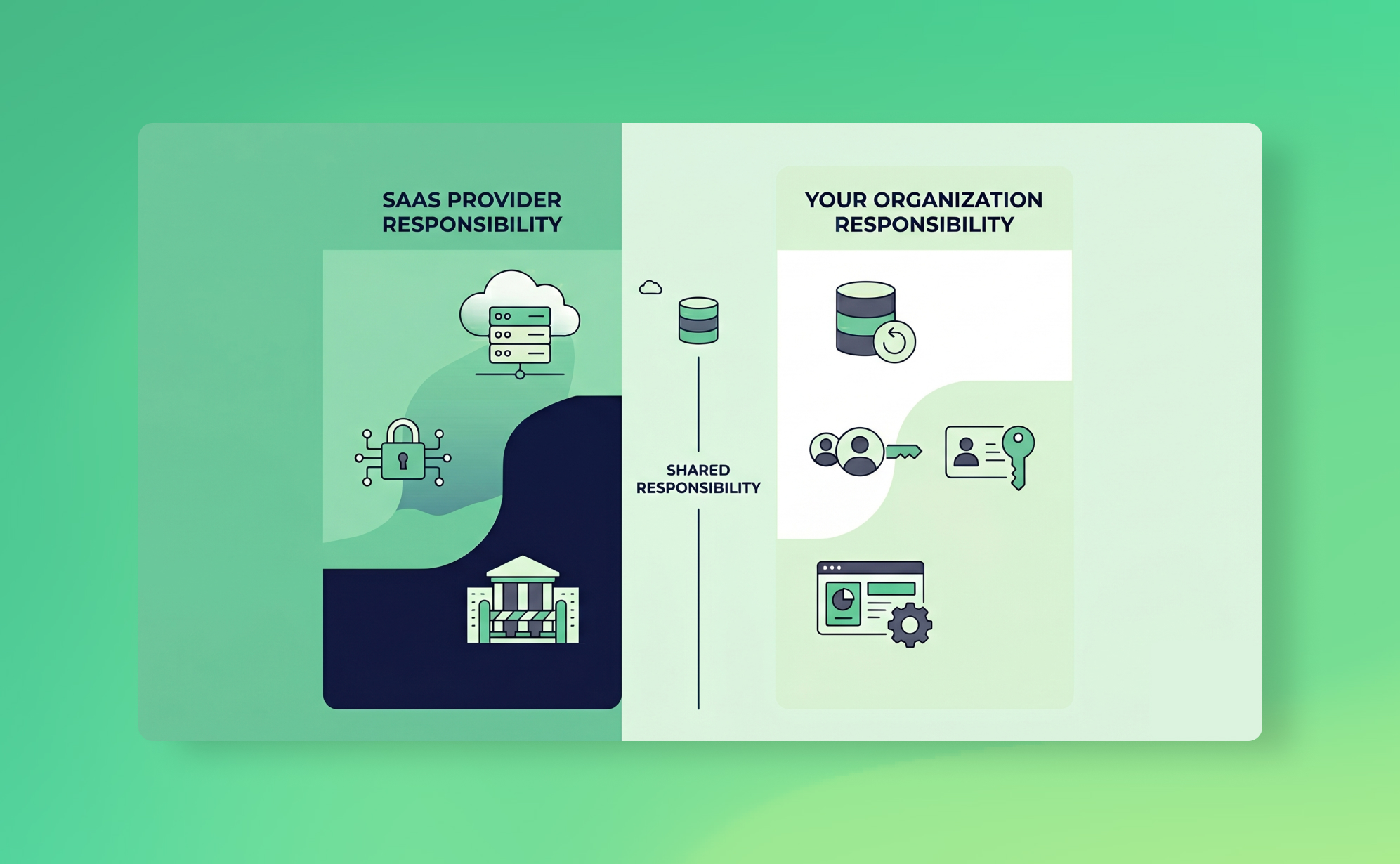
In short: Under the shared responsibility model your SaaS provider secures the platform (uptime, infrastructure, encryption) while you are responsible for your account data: access, MFA, and recovery from deletions, bad imports and integration errors. Native recycle bins cap at 30 days on Asana and monday.com and miss overwritten fields. CodeSpaces (2014) and the Snowflake breaches (2024) show what ignoring this costs.
Most teams assume their SaaS provider has their back when something goes wrong. Deleted board? Corrupted import? Surely there's a way to get it all back.
There isn't. Or at least, not in the way you'd expect.
SaaS providers operate under what's called the shared responsibility model. The short version: they keep the platform running, and you keep your data safe. If your Asana workspace gets wiped because someone ran a bad CSV import at 4pm on a Friday, that's on you. The provider will shrug, point to their terms of service, and wish you luck.
This misunderstanding is remarkably common. Teams discover it after a data loss incident and say some version of "I thought Asana/monday.com/Trello handled that." They didn't. And the terms of service said so all along.
This post explains where the model came from, how it works in practice, and what you can do about it.
What is the shared responsibility model?
The concept started in cloud infrastructure. When AWS popularised it in the early 2010s, the split was relatively intuitive: AWS secures the physical servers, the network, and the hypervisor. You secure everything you put on top, including your operating system, your application code, and your data.
It made sense because IaaS customers were already used to managing servers. They understood that renting compute power didn't mean outsourcing security.
The model has since been adopted by virtually every cloud and SaaS provider. Sometimes it's spelled out explicitly. Sometimes it's buried in legal fine print you'd need a lawyer to find. Microsoft, Google, Salesforce, Atlassian: they all describe some version of it in their documentation. The language varies, but the principle is the same. The provider is responsible for the platform. You are responsible for what you do with it.
How it applies to SaaS apps
Here's where things get tricky. With IaaS, the division of labour is fairly obvious. You're managing virtual machines and storage buckets. You know you're in charge.
With SaaS, the abstraction is much higher. You don't see the infrastructure. You log in, create boards, assign tasks, upload files, and everything just works. It feels like the provider is handling everything, including protecting your data.
They're not.
What SaaS providers typically handle is platform-level resilience: replication across data centres, disaster recovery for their own infrastructure, uptime SLAs. If their servers go down, they'll recover. If you delete a project, or a rogue integration overwrites 500 records, or a former employee nukes your workspace on their way out? That's your problem. The same line runs through the project management apps teams rely on every day.
Most SaaS apps offer some recovery features. Trash folders, undo buttons, version history. But these have limits. Asana's recycle bin keeps deleted items for 30 days. Trello's undo is even more limited. monday.com's Recycle Bin also caps at 30 days. And none of these features protect against the scenarios where you really need them: bulk data corruption from a bad integration, malicious deletion by a compromised account, or silent data loss you don't notice until weeks later when the recycle bin has already emptied itself.
What SaaS providers are (and aren't) responsible for
Let's be specific. Most B2B SaaS apps invest heavily in platform security: encryption at rest and in transit, SOC 2 compliance, regular penetration testing. That's real, and it matters.
But there's a gap between "platform security" and "your data is protected" that catches a lot of teams off guard, which is exactly why vendor backups are not your backup.
What the provider typically covers: infrastructure uptime and disaster recovery, physical security of data centres, encryption of data at rest and in transit, platform-level vulnerability patching, and providing authentication systems (though whether you actually configure MFA is on you).
What you're responsible for: who has access to your account and what permissions they have, whether MFA is enabled for all users, recovering from accidental or malicious deletions within your workspace, protecting against data corruption from integrations and imports, maintaining independent backups of your account data, and meeting your own compliance obligations around GDPR data retention, audit trails, and similar regulatory requirements.
The most common causes of SaaS data loss, human error, malicious insiders, and faulty integrations, all fall squarely on the customer side of the line. That's an uncomfortable thing to sit with if you've been assuming your provider had it covered.
When the model fails: real-world incidents
The shared responsibility model works fine when both sides hold up their end. The problem is that many organisations don't realise they have a side until something breaks. Even a provider-side outage lands on your side of the line: here is how one customer kept working through the AWS outage.
CodeSpaces (2014)
CodeSpaces was a code-hosting provider built on AWS. In June 2014, an attacker gained access to their AWS EC2 control panel during a DDoS attack. When extortion negotiations broke down, the attacker systematically deleted all EBS snapshots, S3 buckets, and machine images over a 12-hour window.
The company had backups. But they were stored in the same AWS account the attacker had compromised. Every redundancy layer they'd built was inside the blast radius.
CodeSpaces shut down permanently within 24 hours. Their website had previously advertised "full redundancy" and a "proven" recovery plan. It didn't help that AWS had offered MFA and IAM best practices that CodeSpaces apparently hadn't implemented. A textbook shared responsibility failure: the provider offered the tools, the customer didn't use them, and when things went wrong, there was nothing to fall back on.
Snowflake customer breaches (2024)
This one deserves a closer look, because it's the clearest recent example of what happens when the shared responsibility model meets reality at scale.
In mid-2024, attackers used stolen credentials, harvested from infostealer malware on employee machines, to access Snowflake customer environments. The credentials worked because the affected accounts hadn't enabled multi-factor authentication. Snowflake's platform itself wasn't breached. The attackers just logged in with valid usernames and passwords.
The scale was staggering. Over 160 organisations were targeted. Confirmed victims included AT&T (call metadata for nearly all US customers compromised), Ticketmaster, Santander Bank, Lending Tree, and Neiman Marcus. The personal data of over 500 million individuals was exposed. AT&T reportedly paid $370,000 in ransom.
Snowflake's response was firm and consistent: this wasn't a platform vulnerability. Customers were responsible for enabling MFA and managing their own access controls. And technically, Snowflake was right. Their shared responsibility documentation made it clear that customers manage their own credentials.
But "technically right" doesn't undo a breach affecting hundreds of millions of people.
Here's what we keep coming back to about the Snowflake incident. Snowflake didn't require MFA. They offered it as an option and left enforcement to each customer. Many customers assumed their cloud data warehouse provider was handling that sort of thing. The result was a grey zone between what the provider offered and what the customer configured. Attackers walked straight through it.
Snowflake has since made MFA mandatory for new accounts. But the damage was already done, financially and reputationally. There's now consolidated litigation in US federal court involving Snowflake, AT&T, Ticketmaster, and several other defendants.
The lesson isn't necessarily that Snowflake did something wrong (though you could argue they should have enforced MFA sooner). The lesson is that the model creates gaps. And those gaps are easy to miss when the provider's platform feels secure enough that you stop thinking about your own obligations.
How to protect your side
Knowing the model exists is step one. Acting on it is harder, mostly because it requires admitting that your SaaS provider, however good, is not your backup plan.
1. Audit what your SaaS apps actually retain, and for how long
Log into each platform your team relies on and check the data retention policy. Look for recycle bin time limits, version history depth, and what happens when you downgrade or cancel your plan. You'll probably find the recovery window is shorter than you assumed. This is especially true for project management tools where native archiving and undo features have significant gaps.
If you're subject to GDPR, SOC 2, or similar regulations, also check whether your provider's native retention meets your compliance obligations. Often it doesn't, and that gap becomes your problem.
2. Enforce MFA everywhere
The Snowflake breach happened because accounts lacked MFA. That's it. Stolen passwords are common. MFA stops them from being useful. If your SaaS app offers it, turn it on. If it doesn't, that should factor into your vendor evaluation.
3. Review permissions quarterly
Who has admin access? Who left the company three months ago but still has an active account? Who has write access but only needs read? Malicious or careless insiders are one of the most common causes of data loss, and access reviews are the simplest way to reduce that risk.
This isn't glamorous work. But it closes one of the most exploitable gaps in the shared responsibility model.
4. Set up independent, automated backups
This is the one we obviously care about most, but also the one that matters most practically.
If your SaaS provider's recovery features are your only safety net, you don't really have a safety net. You need backups stored independently from the source platform, with their own authentication and retention policies. That way, a compromised SaaS account can't take your backup data with it. This is exactly what CodeSpaces lacked: their backups lived in the same environment as the data they were supposed to protect.
This is exactly what ProBackup does. We run daily automated snapshots of your SaaS data across 20+ apps, including Asana, Trello, monday.com, ClickUp, HubSpot, Jira, and Notion. Everything is stored in our own encrypted AWS infrastructure, in one of nine AWS regions — you select the region at signup and it applies to every backup in your ProBackup account — using AES-256 encryption with separate credentials that are completely isolated from your SaaS accounts. If something goes wrong in any of your connected apps, you can restore individual records, comments, files, or entire projects from any previous snapshot.
Plans start at $25/month (billed yearly) and include unlimited apps. See how other teams use ProBackup to recover from data loss on our success stories page.
5. Test your restores
Having backups you've never tested is barely better than having no backups at all. Pick a date from last month. Try restoring a project or a set of records from that snapshot. If it works, you're covered. If it doesn't, better to find out now than during an actual incident.
What to do next
The shared responsibility model isn't going away. It's a reasonable division of labour, and honestly, it makes sense. Providers can't anticipate every way their customers might misconfigure access or accidentally destroy data. The model just requires both sides to understand what they own.
Most data loss doesn't come from dramatic infrastructure failures. It comes from someone on your team making a mistake, an integration misfiring, or a compromised credential that nobody noticed. Those are your problems to solve.
Audit your retention policies. Enforce MFA. Clean up permissions. Back up your data independently. Test your restores.
If you want to see what automated SaaS backups look like in practice, start a free trial. Setup takes about three minutes, and you'll have your first snapshot within 24 hours.

Related posts
How to back up Webflow (and restore deleted data)
How to back up Notion (and restore deleted data)
How to back up Teamwork (and restore deleted data)