Where is your SaaS backup stored? Data residency for Asana, HubSpot, monday.com and 20+ apps
An evergreen explainer on why the storage location of a backup copy matters under GDPR Chapter V and NIS2 Article 21, how ProBackup's per-account AWS region works, and how to choose one.

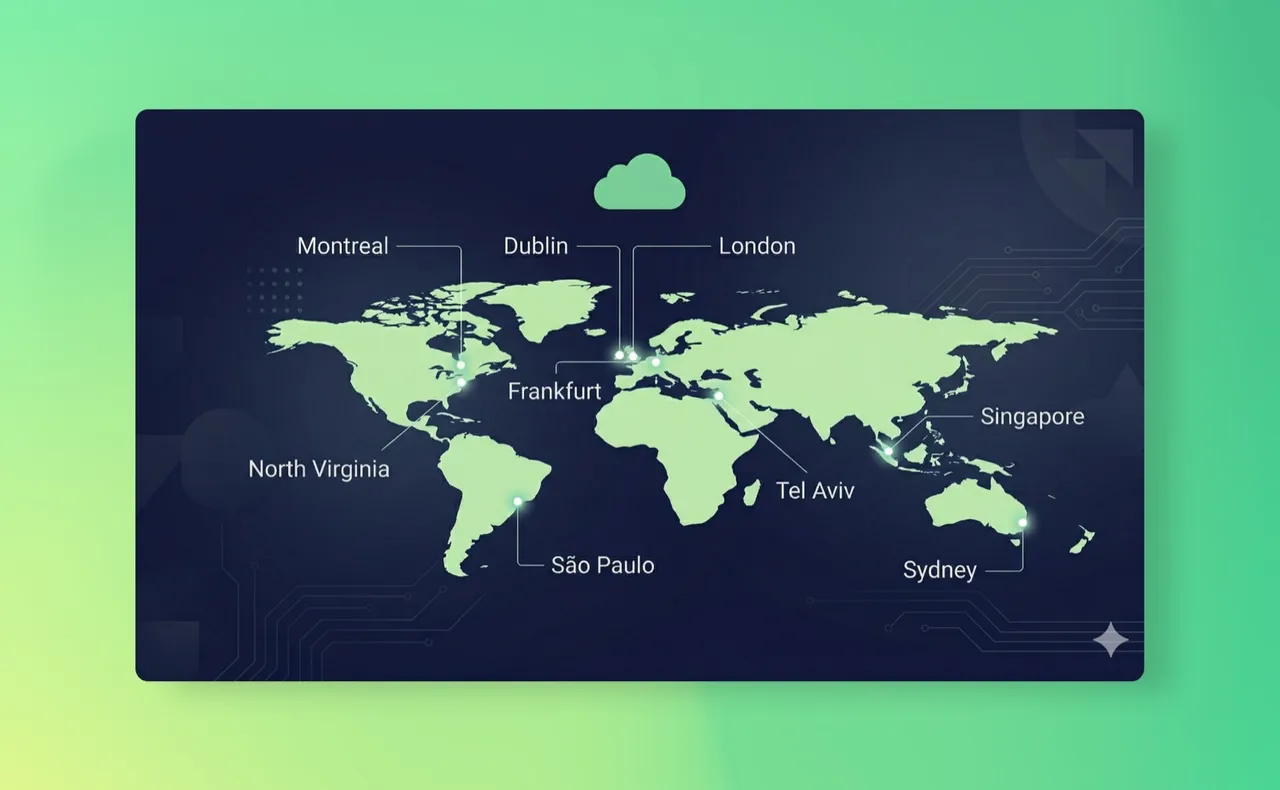
In short: A backup is a second copy of your data, so it falls under the same transfer rules as the original. ProBackup stores every snapshot on AWS S3 in one of nine AWS regions. You pick the region when you create your account, it applies to every app you back up, and support can move the account later.
Why the location of a backup copy matters
When your team evaluates a backup tool for Asana, HubSpot, monday.com, ClickUp or any other cloud app, the first question from legal is usually not "how fast can we restore?" but "where does the copy live?". There are three reasons the question is legitimate.
1. GDPR treats a backup as a transfer like any other
Chapter V of the GDPR governs transfers of personal data outside the EU/EEA. Article 44 sets the general principle: any transfer of personal data to a third country "shall take place only if ... the conditions laid down in this Chapter are complied with by the controller and processor" (Art. 44 GDPR, checked 2026-09-16). Nothing in the text exempts copies made for backup purposes. If your CRM contacts are personal data in HubSpot, they are still personal data in the snapshot.
A transfer is lawful when the destination country has an adequacy decision (Art. 45, checked 2026-09-16) or when appropriate safeguards are in place, such as binding corporate rules or standard data protection clauses adopted by the Commission (Art. 46, checked 2026-09-16). The European Data Protection Board's guide for small businesses walks through the same three routes: adequacy decision, appropriate safeguards, and, as a last resort, derogations (EDPB, International data transfers, checked 2026-09-16).
Every one of those mechanisms is paperwork you have to produce and defend. Keeping the backup in the same jurisdiction as the source data removes the transfer question for that copy entirely. That is why a compliance team asks about location before it asks about features.
2. NIS2 makes backup management a named security measure
For organisations in scope of the NIS2 Directive, Article 21 lists the minimum cybersecurity risk-management measures. Point 2(c) names "business continuity, such as backup management and disaster recovery, and crisis management" (Directive (EU) 2022/2555, Art. 21, checked 2026-09-16). The directive is in force at EU level; how and when it is transposed into national law varies by member state, so check your country's status before quoting a deadline.
A backup you cannot place, describe or audit is a weak answer to "show us your backup management". A backup with a known region, a known encryption standard and an audited provider is a strong one. See our post on NIS2 backup requirements for the full picture.
3. Customers and regulators ask, and "we don't know" is not an answer
Beyond the EU, sector regulators, public-sector procurement teams and enterprise customers routinely require data, including backups, to remain within a given jurisdiction. The specifics differ by country and industry, and this post is not legal advice. The practical point is the same everywhere: you need to be able to state where the copy is, in one sentence, with a source.
How ProBackup's data region works
ProBackup is a SaaS backup service that takes automated daily snapshots of your cloud app data and lets you restore individual records, files or whole projects back to the original account. Each snapshot is stored as JSON plus attachments on AWS S3, encrypted with AES-256 at rest and TLS in transit.
The region rules are deliberately simple:
- Nine AWS regions. When you create your ProBackup account you choose one of nine AWS data regions. ProBackup pre-selects the closest one; you can pick any other from the list.
- One region per account. The region applies to every backup in the account. If you back up Asana, HubSpot and monday.com under the same ProBackup account, all three live in the same region. One app cannot sit in a different region from another.
- Changing region goes through support. Once backups are running, the region cannot be changed from the interface. Contact support and we move all of the account's backups to the new region. It is not locked forever; it is just not a self-service toggle, because moving live snapshot history is an operation we want to supervise.
- Same price on every plan. Region choice is available on Plus, Pro and Premium at no extra cost. Plans start at $25 per month, billed yearly (see pricing).
- The application runs in Ireland. The region decides where your backup data is stored. The ProBackup application that runs the backups, and its databases with account details and backup metadata such as workspace structure, run on AWS in Ireland (eu-west-1).
ProBackup acts as a data processor for your account data; you remain the controller, and AWS is a sub-processor. The full processor terms are on our GDPR page.
| Question | Answer |
|---|---|
| Where is the backup stored? | AWS S3, in the AWS region you selected at signup |
| Where does the application run? | AWS Ireland (eu-west-1), including its databases with account details and backup metadata |
| How many regions are available? | Nine |
| Does the region apply per app or per account? | Per account: all backups in one account share the region |
| Can I change it later? | Yes, via support, which moves all backups in the account |
| Encryption | AES-256 at rest, TLS in transit |
| Independent assurance | SOC 2 Type II (since May 2025; latest report period 1 April – 30 June 2026), see the trust centre |
How to choose a region
Most teams can settle this in a five-minute conversation. Three questions:
- Where is your team? If everyone who will browse and restore backups sits in one country or economic area, the region covering that area is the default choice.
- Where are the people in the data? For a HubSpot or Pipedrive backup, the contacts are the data subjects. If they are overwhelmingly in one jurisdiction, keeping the copy there avoids a transfer.
- Who will ask? If a regulator, an enterprise customer or a public-sector contract already tells you where data must stay, that answer wins over the first two.
If the three answers disagree, choose the region that satisfies the strictest requirement, and note the decision in your data-processing register so the next audit takes ten minutes instead of a week.
One thing the region does not do: it does not, on its own, make you GDPR or NIS2 compliant. Residency removes one transfer question. Access control, retention, encryption and a tested restore process are separate items on the same checklist. See data security at ProBackup and our earlier post on GDPR and cloud backups.
Frequently asked questions
Where is my Asana, HubSpot or monday.com backup stored?
On AWS S3 in the AWS region you selected when you created your ProBackup account. All apps in the account share that region.
Does anything leave my chosen region?
Backup data stays in your region. The ProBackup application and its databases, which hold account details and backup metadata such as workspace structure, run on AWS in Ireland (eu-west-1), and your data passes through that application while a backup or restore runs.
Can I keep my HubSpot backup in one region and my ClickUp backup in another?
Not within one ProBackup account. The region is set per account and applies to every backup in it. Teams that genuinely need two regions run two accounts.
How do I change my data region after backups have started?
Contact support. The change is not available in the interface because it involves moving the account's full snapshot history; support carries out the move for all backups in the account.
Does choosing an EU region make my SaaS backup GDPR compliant?
It removes the international-transfer question for the backup copy. GDPR compliance also depends on your legal basis, retention, access control and processor agreement. ProBackup provides the processor terms on the GDPR page and the audit evidence on the trust centre.
Choose your region and start backing up
Create an account at app.probackup.io/onboarding, pick a region, and connect your first app. The 7-day trial needs no credit card. The interface itself runs in five languages, including French and German.
The regulatory summaries above are a general overview to help you start the conversation internally, not legal advice. Check requirements specific to your organisation and industry with your own legal or compliance team.