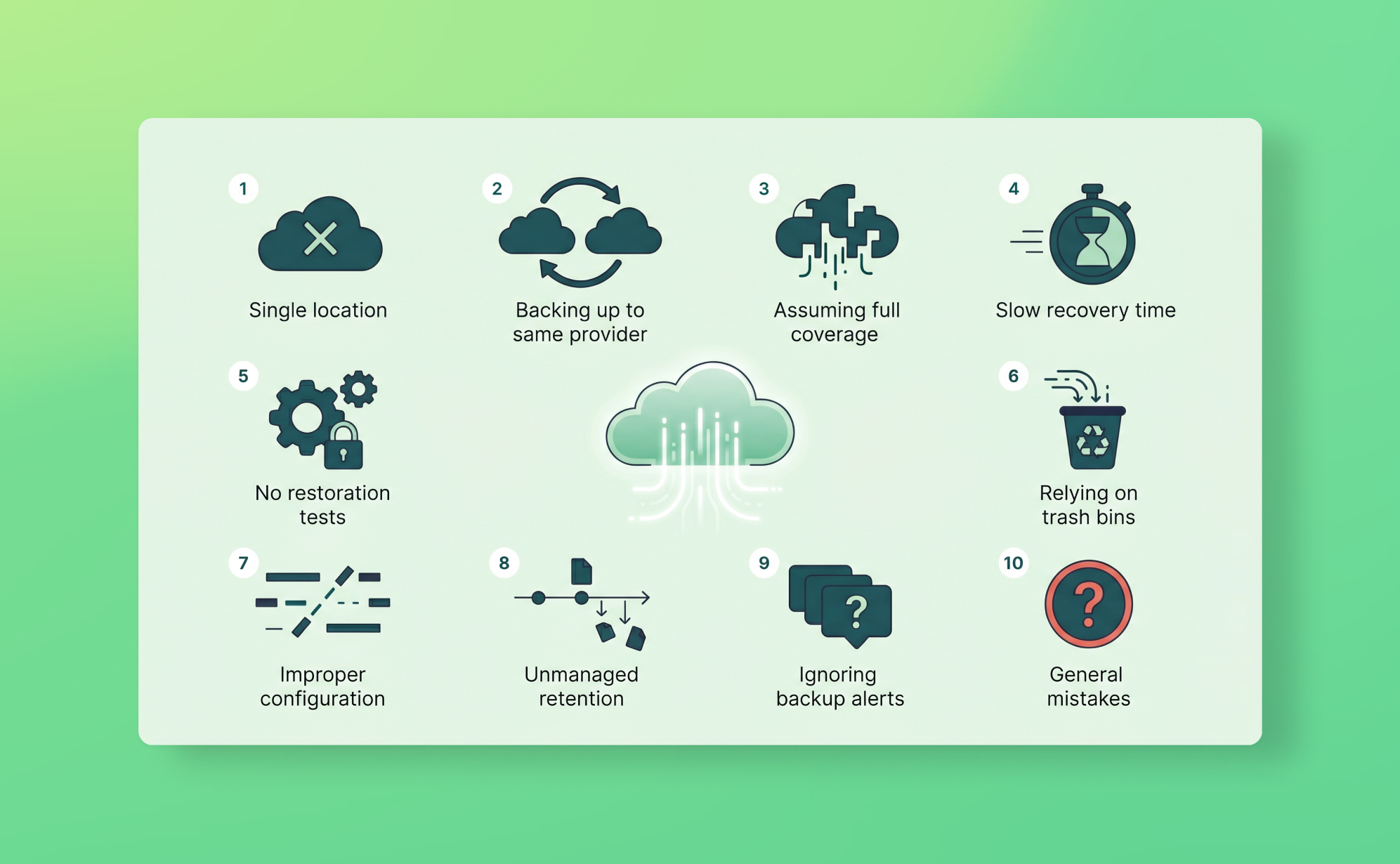
In short: The ten SaaS backup mistakes are: assuming the provider backs up your account data, treating the recycle bin as a backup, covering only some apps (private workspaces included), never testing restores, ignoring comments, attachments and metadata, having no retention policy, backing up to the same provider, no access controls on backup data, forgetting compliance requirements, and no monitoring between backups.
Most teams that experience a serious SaaS data loss had backups. Or thought they did. The problem usually isn't that nobody set anything up. It's that what they set up had a gap nobody noticed until something broke.
These are the ten mistakes we see most often, and the ones that are most likely to matter when you actually need to recover something.
Mistake 1: Assuming your SaaS provider backs up your data
This is where almost every other mistake starts. The assumption feels reasonable: your data is in the cloud, the provider runs the cloud, so surely they're looking after it.
They are, but not in the way you'd hope. The shared responsibility model means your SaaS provider protects the platform infrastructure. If their servers fail, they recover. What they don't protect is what happens inside your account: accidental deletions, bad imports, malicious actions by someone with access, integration errors that overwrite data silently.
Providers state this clearly in their terms of service. Most customers never read those terms until something goes wrong. Asana's terms explicitly state that users are responsible for maintaining copies of their own content. monday.com's data policy is similar. So is HubSpot's. The shared responsibility clause is in there; it's just in the kind of language nobody reads voluntarily.
The practical consequence: when data disappears from your workspace, your provider's infrastructure backup won't help you. That data was never part of what they were backing up. Support will confirm the deletion happened, sometimes tell you who did it, and wish you luck.
Mistake 2: Relying on the recycle bin as a backup
The recycle bin works just often enough to create a false sense of security. Someone deletes a task, finds it in the trash, restores it, and moves on. The next time something goes wrong, they expect the same thing to work.
Most platforms cap recycle bin retention at 30 days. Trello has no recycle bin for deleted cards at all. But the expiry window isn't even the main problem. Recycle bins don't cover bulk overwrites from bad imports, field configuration changes, automation errors, or anything modified rather than deleted. If a CSV import overwrites 300 custom field values with wrong data, nothing goes to the trash because nothing was deleted. The platform sees an update, not a deletion, and the recycle bin is blind to it.
Recycle bins are undo buttons. They handle "I just deleted this by accident." They are not data protection.
Mistake 3: Only backing up some of your apps
This one is less obvious, and more common than it sounds. A team connects their primary project management tool to a backup solution, considers it handled, and stops there. Meanwhile, three other apps containing business-critical data sit entirely unprotected.
It happens gradually. The backup gets set up when the company is small and only has a few critical tools. The SaaS stack grows. Nobody loops back. The SaaS audit that would catch this never happens.
The result: partial coverage that looks like full coverage. You have a backup, so you feel protected, but two of your five critical apps are completely exposed. The CRM that holds three years of client history. The HubSpot portal where your sales team logs every deal interaction. Neither of them in scope.
This is also where private workspaces create a specific gap. In tools like Asana, ClickUp, and Trello, backup scope is workspace-level. If the person who set up the backup doesn't have access to another team member's private workspace, that data isn't included. The backup runs, the status emails look clean, and nobody knows there's a gap until someone asks for data from a workspace that was never in scope. A team leader who kept all her client notes in a private Asana project leaves the company. Her successor asks where the project history is. The answer is: it was never backed up.
Mistake 4: Never testing your restores
Having backups you've never tested is roughly equivalent to having a fire extinguisher you've never checked is charged. It might work when you need it. It might not. You have no way to know.
The problem compounds under pressure. The worst time to figure out how a restore works is during an actual incident, when someone is standing behind you asking what's happening and the client is waiting for an update. The mechanics of navigating the vault, selecting a snapshot, choosing the right restore method, finding the restored items in your app: none of these should be learned for the first time in that moment.
Testing takes about 20 minutes and reveals things you wouldn't otherwise know: which data types can't be restored due to API limitations, how long a large restore actually takes, what the restored items look like in your app. Run one quarterly. Document the result. That log is also what SOC 2 and ISO 27001 auditors will ask for.
Mistake 5: Ignoring metadata, comments, and attachments
Teams often think of their data as the records: the tasks, items, contacts, deals. The fields that live in those records. But a lot of the operational value is in the context around them: comments where decisions were made, file attachments that document deliverables, activity logs that show who changed what and when.
Not all backup tools capture this, and not all platforms expose it through their API. This is worth checking specifically.
For example, Asana's API doesn't expose comments on subtasks, so those can't be backed up. Files attached to Asana tasks via Dropbox, Google Drive, or OneDrive links aren't captured either, only files uploaded directly. In monday.com, files uploaded directly to an item (rather than through a file column) aren't included. In Trello, Power-Ups and automation rules aren't accessible through the API at all.
There's also a character limit worth knowing: ProBackup captures the first 2,500 characters of any text field or comment. For most comments that's fine. For long project notes or detailed descriptions, content beyond that threshold isn't stored.
None of these are bugs. They're API limitations that every backup tool working with these platforms will hit. The mistake is assuming everything is captured when some of the most contextually rich data isn't.
Mistake 6: No retention policy
Daily backups with 30 days of retention sound reasonable until you face the most common real-world failure mode: the problem that nobody notices for six weeks.
A misconfigured integration silently overwrites a field across hundreds of records. A former employee deleted a project's history before leaving. Someone changed a custom field configuration and removed several options that tasks were assigned to. None of these are obvious immediately. Teams often don't notice until a client asks a question, a report looks wrong, or someone goes looking for something that should be there.
If your backup retention is shorter than your detection window, the clean snapshot you need is gone before you realise you need it.
Setting a meaningful RPO requires thinking about your worst-case detection time, not your average case. If your team might not notice a data problem for two months, you need at least two months of retention. For compliance-driven teams, the requirement is typically longer. SOC 2 and ISO 27001 both expect you to document your retention policy and justify it against your recovery objectives, not just set a default and leave it.
Retention settings also need to be protected. In most backup tools, reducing the retention period permanently deletes older snapshots. This should require explicit approval from the policy owner, not just anyone with admin access.
Mistake 7: Backing up to the same provider
This is the most technically interesting mistake, and the one most likely to cause complete, unrecoverable data loss.
The scenario: your SaaS app and your backup are both hosted by the same cloud provider, sometimes even under the same account. When the provider has an incident, both the source data and the backup go down together. When a malicious actor gains access to your account, they can reach both. Your backup isn't independent. It's just a copy stored in the same blast radius.
CodeSpaces, a code-hosting provider built on AWS, learned this in 2014. An attacker gained access to their AWS control panel and systematically deleted all EBS snapshots, S3 buckets, and machine images. CodeSpaces had backups. They were stored in the same AWS account. The company shut down permanently within 24 hours.
This pattern applies at a smaller scale every time someone uses their SaaS provider's built-in export feature as their "backup." The export lives in Google Drive, which is authenticated with the same Google account as the workspace. The workspace gets compromised; the export goes with it.
A genuine independent backup means different infrastructure, different authentication, different provider. ProBackup stores all backup data in AWS with AES-256 encryption, in one of nine AWS regions — the region is selected by the customer at signup and applies to every backup in the ProBackup account — using access tokens that are completely isolated from your SaaS accounts. Compromising your Asana or monday.com account gives an attacker no pathway to your ProBackup data.
Mistake 8: No team access controls on backup data
Who can access your backup vault? Who can trigger a restore? Who can see what data was deleted and when?
Most teams set this up for their primary admin and never think about it again. The result is that either too many people have restore access (including former employees), or too few people do (so if the primary admin is unavailable during an incident, nobody else can do anything).
Access controls on backup data deserve the same attention as access controls on the source platform. In ProBackup, the admin user has full access. Invited users can be granted per-platform permissions at three levels: view only, export, or full restore. These should be set deliberately, not left at defaults.
Offboarded employees are a specific risk. If someone with restore access leaves the company and their backup account isn't deactivated, they have access to a historical record of your organisation's data, including things deleted months before they left. That's a data exposure problem, not just a security hygiene issue. GDPR's principle of data minimisation applies here: access to personal data should be limited to those who currently need it.
Two-factor authentication on backup tool accounts is non-negotiable. It's the same lesson the Snowflake breach taught at scale: stolen credentials are common, MFA stops them from being useful.
Mistake 9: Forgetting about compliance requirements
Backup is often treated as an operational concern rather than a compliance one. That's a mistake for any organisation subject to GDPR, SOC 2, ISO 27001, or sector-specific regulations.
SOC 2's Availability trust service criterion requires demonstrable evidence that you can restore data within documented recovery objectives. An auditor will ask for your backup policy, status reports showing backups are running, and records of restore testing. "We have backups" isn't evidence. Documented procedures and test logs are.
ISO 27001 Annex A.12.3 requires documented backup procedures including scope, frequency, retention, and regular testing. The standard also requires that backup storage be "adequately protected," which means physical security, encryption, and access controls.
GDPR adds a specific wrinkle: when a data subject requests deletion under Article 17, you must delete their data from live systems. But that data may persist in backup snapshots until the retention period expires. Your backup policy should document this as a known behaviour and, if your compliance obligations require it, define a process for removing personal data from backups on request.
Teams that treat backup as pure ops and never connect it to compliance often discover the gap during an audit rather than before one.
Mistake 10: No monitoring between backups
Daily backups are a 24-hour safety net. But between backups, things happen. A disgruntled employee mass-deletes 400 tasks on a Tuesday afternoon. An integration misfires and clears a column across an entire board. Someone with admin access empties the recycle bin.
Without monitoring, none of this surfaces until the next backup cycle, by which time the window for catching it in real time has closed. If you notice on Wednesday that your Tuesday afternoon was catastrophic, you can restore from Tuesday morning's snapshot and lose a few hours of work. That's recoverable. If you notice on Friday because someone finally went looking for a task that should have been there, you're in a different situation: multiple days of legitimate work happened on top of the corrupted state, and disentangling what to restore is significantly harder.
Proactive alerts close this gap. ProBackup's smart alert system notifies you when unusual deletion activity is detected, for example a spike where far more items than normal are removed in a short window. On Pro and Premium plans, weekly status emails summarise backup health, storage usage, and recent deletion activity across all connected platforms.
Monitoring doesn't replace backups. It shortens the detection window that determines whether a restore is a quick fix or a complex, multi-day reconstruction.
Quick reference: the 10 mistakes at a glance
| # | Mistake | Risk level | Fix |
|---|---|---|---|
| 1 | Assuming your provider backs up your data | Critical | Understand the shared responsibility model; don't rely on provider ToS |
| 2 | Relying on the recycle bin | High | Treat the bin as undo, not backup; use independent daily backups |
| 3 | Only backing up some of your apps | High | Audit your full SaaS stack; include private workspaces |
| 4 | Never testing restores | High | Run a quarterly restore test; document results |
| 5 | Ignoring metadata, comments, and attachments | Medium | Check per-platform API limitations; know what's excluded |
| 6 | No retention policy | High | Set retention to exceed your worst-case detection window |
| 7 | Backing up to the same provider | Critical | Use independent infrastructure with separate authentication |
| 8 | No access controls on backup data | Medium | Assign permissions deliberately; deactivate offboarded users; enforce 2FA |
| 9 | Forgetting compliance requirements | Medium | Connect backup to SOC 2, ISO 27001, and GDPR obligations; document everything |
| 10 | No monitoring between backups | Medium | Enable smart alerts and weekly status reports |
What to do now
If any of these mistakes apply to your current setup, the fix is usually simpler than it looks.
Run a SaaS data protection audit to find your coverage gaps. Write or update your backup policy to document scope, retention, ownership, and access controls. Run a test restore if you haven't done one recently.
If you don't yet have independent, automated backups for your SaaS stack, start a free trial of ProBackup. Setup takes about three minutes per app and covers 20+ platforms under a single licence, including Asana, monday.com, ClickUp, Trello, Notion, HubSpot, Jira, Airtable, and Slack. Plans start at $25/month (billed yearly).
See how other teams have used ProBackup to recover from real data loss on our success stories page.

Related posts

How to back up Webflow (and restore deleted data)

How to back up Notion (and restore deleted data)
How to back up Teamwork (and restore deleted data)