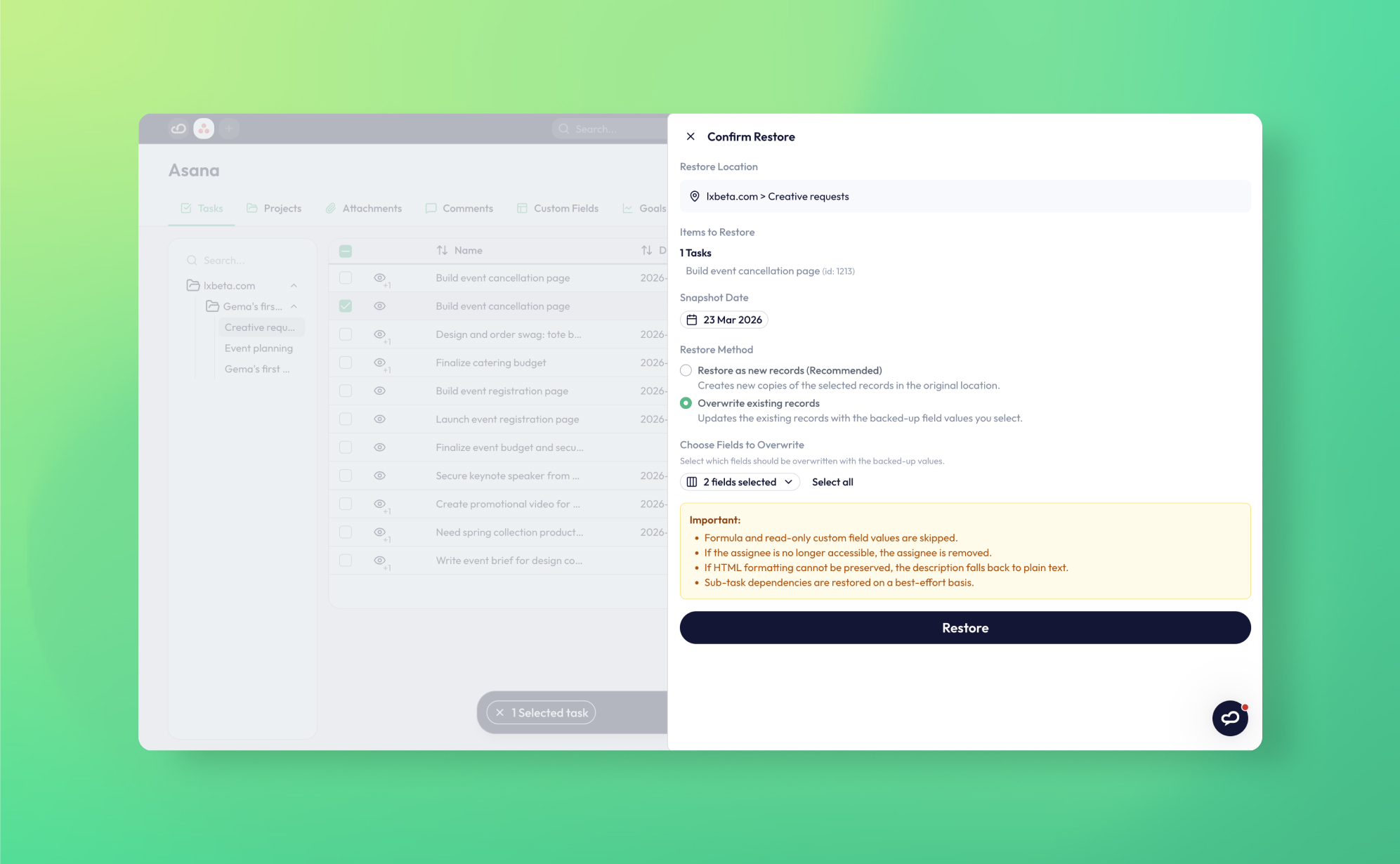
In short: Since March 2026 ProBackup offers two restore methods: 'Restore as new records' (the default; creates a fresh copy without touching live data) and 'Overwrite existing records', which updates a live record with values from any backup date, limited to the fields you tick. Per-data-type constraints, such as Asana formula and read-only custom fields, are shown in the restore pane.
We've just shipped a significant upgrade to ProBackup's restore experience. and if you've ever needed to roll back changes to a record that's still live in your app, this one's for you.
What's new
Until now, ProBackup always restored data as new records. That's still the safest and most common approach, but it isn't always what you need. Sometimes a record wasn't deleted; it was changed. Someone updated the wrong fields, an automation went sideways, or an AI agent touched things it shouldn't have. The record still exists, but the data inside it is wrong.
Starting today, you can restore directly into existing records, overwriting only the specific fields you choose.
How it works
When you select a record and click "Restore...", a restore pane opens on the right. You'll now see a Restore method option with two choices:
- Restore as new records (recommended): The existing behaviour. Creates a fresh copy of the record in its original location without touching anything currently in your app.
- Overwrite existing records: Updates the live record with values from a previous backup. When you select this option, a field picker appears so you can choose exactly which fields to overwrite. Everything else stays untouched.
You can also adjust the snapshot date directly in the pane using the date picker, so you're not limited to the most recent backup, you can restore the record as it looked on any date ProBackup has captured.
At the bottom of the pane, ProBackup surfaces any restore constraints for the data type you're working with. For example, formula fields and read-only custom fields can't be restored for Asana tasks. These are shown upfront so there are no surprises.
Both methods run on the same granular restore engine, down to a single record or field.
When to use each method
| Scenario | Recommended method |
|---|---|
| Record was deleted and needs to come back | Restore as new records |
| Record exists but has wrong field values | Overwrite existing records |
| You want to roll back specific fields only | Overwrite existing records + field picker |
| You're unsure | Restore as new records (always safe) |
The same two choices apply on every platform we support, including when you back up HubSpot.
Why this matters
As teams adopt more automation and AI-driven workflows, the risk of bulk, unintended changes to live records has grown significantly. An agent that updates the wrong fields across a hundred tasks, or an automation that fires at the wrong time — these are exactly the scenarios where surgical field-level recovery makes the difference between a five-minute fix and a painful manual cleanup.
Overwrite restore gives you that precision, and makes it practical to undo unwanted AI-agent edits.
ProBackup: built for the complexity of SaaS data
Backup is only as valuable as the restore capabilities behind it. Field-level overwrite restore is part of our broader commitment to building the most capable, granular recovery tooling available for SaaS platforms - going well beyond the basic export-and-reimport approaches that most solutions still rely on.
Whether you need to recover a deleted record, roll back a handful of fields, or undo the aftermath of a runaway automation, ProBackup gives you the control to respond precisely and confidently. That's what best-in-class cloud backup for SaaS looks like in practice.
Getting started
The new restore experience is available now for all ProBackup users. For a full walkthrough of the restore flow, see How to recover deleted data in our Help Center.
Before you need it in anger, it is worth taking the time to run a test restore first.
As always, if you run into anything or have feedback, we'd love to hear from you.

Related posts

How to back up Confluence (and restore deleted data)


How to back up Basecamp (and restore deleted data)

Version history and trash retention in Asana, ClickUp, monday.com, Trello, HubSpot, Airtable, Notion and Jira (per plan, 2026)