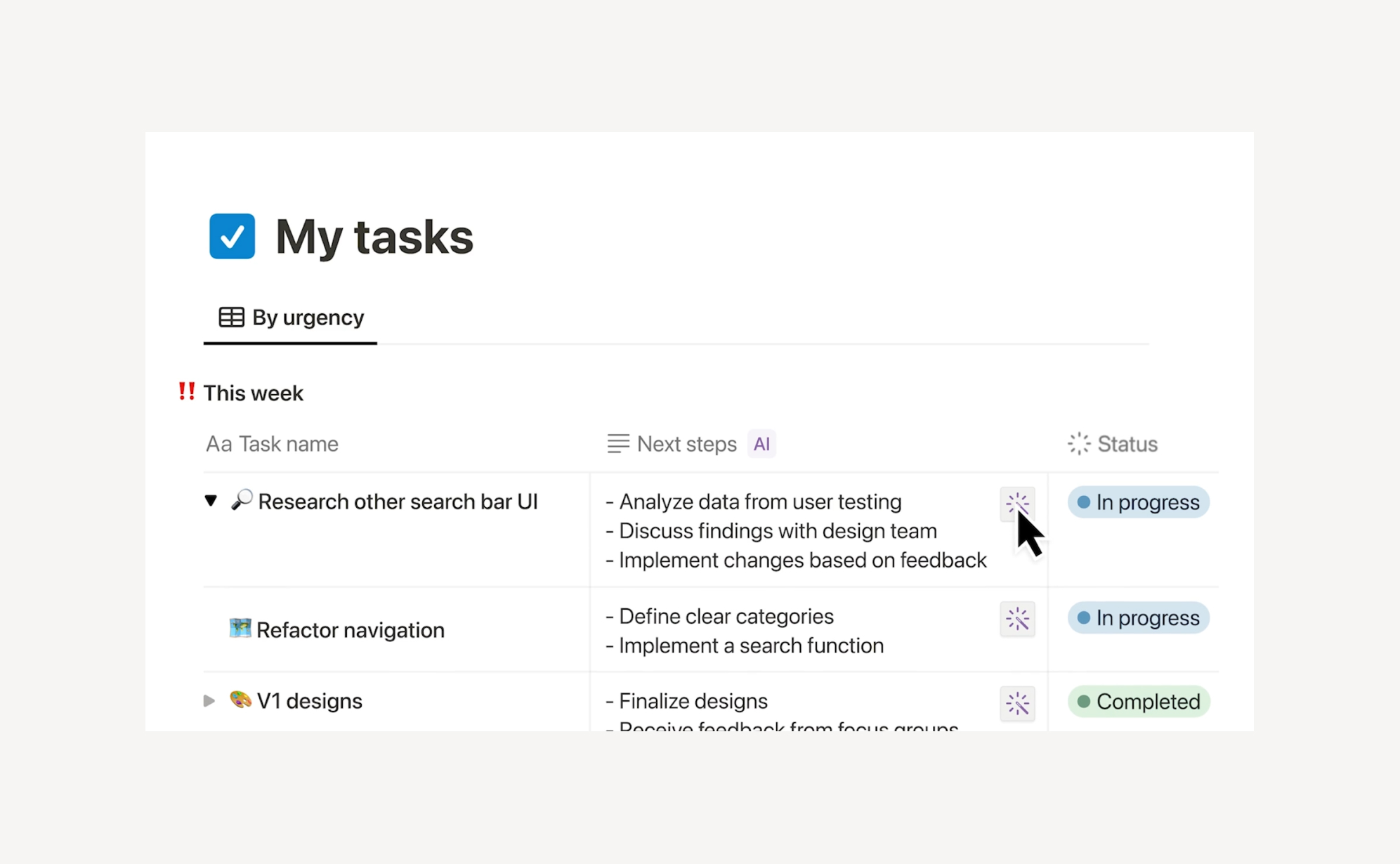
Who this guide is for: Knowledge workers, content teams, project managers, startup operators, and anyone already using — or considering — Notion as their primary workspace. Whether you're new to Notion AI or want to get more out of it, this guide covers everything from the basics to the latest AI features shaping how teams work in 2026.
Notion started as a note-taking tool. Today, it's one of the most powerful AI-connected workspaces on the market — used by over 100 million people across teams at companies like OpenAI, Figma, Ramp, and Nvidia.
If you've been wondering whether Notion AI is worth it, or you're already using it but barely scratching the surface, this guide is for you. We'll cover what Notion AI actually does, where it fits in your workflow, how to get the most out of it, and what the latest AI features mean for how you work.
What Is Notion AI?
Notion AI is an intelligent assistant built directly into your Notion workspace. Unlike standalone AI tools like ChatGPT or Claude, Notion AI has full context of your workspace — your pages, databases, projects, and connected apps — making its output far more relevant to your actual work.
It's not a separate product you switch to. It lives inside the pages and databases you're already using, and you activate it in seconds with a keyboard shortcut or slash command.
What Can Notion AI Help You With?
Notion AI covers a wide range of tasks across writing, organization, analysis, and automation. Here's a breakdown of what's available today:
Writing and content creation: Generate first drafts of blog posts, emails, project briefs, meeting agendas, SOPs, and more. You can prompt it from a blank page or ask it to expand on your bullet points.
Editing and improving existing content: Highlight any text and hit "Ask AI" to fix grammar, improve clarity, change tone (more professional, more concise, more friendly), or rewrite a section entirely.
Summarization: Use the /summarize block to generate an executive overview of any document in seconds. Especially useful for long meeting notes, customer research docs, or lengthy reports.
Action item extraction: Use /action items to extract tasks and commitments from messy notes or call transcripts. Notion AI parses the full context of the page to find what actually needs to happen next.
Brainstorming and ideation: Stuck? Ask Notion AI to generate ideas, write a counter-argument, suggest approaches, or outline a project structure. Give it context about what you're trying to accomplish and it'll generate relevant options.
Translation: Translate content into 10+ languages without switching tools. Useful for global teams or anyone working across language barriers.
Research Mode: Ask Notion AI a research question and it will generate a detailed, structured report — drawing on workspace context plus web knowledge when configured to do so.
Database automation (Autofill): Use AI to auto-populate database properties. For example, automatically generate a summary of a meeting note, categorize a CRM entry, or write a description for a project card.
Where Can You Use Notion AI?
Notion AI is available throughout the platform:
Pages and Docs — Press Space on any new line to start generating, or highlight text and select "Ask AI" to edit. Use /AI to insert AI blocks that pull context from the whole page.
Databases — Use Autofill to have AI automatically populate properties like summaries, categories, statuses, or descriptions. Great for project trackers, CRM entries, and content calendars.
Meeting Notes — AI Meeting Notes can capture and transcribe meetings from Zoom, Google Meet, or Teams — automatically generating summaries, key decisions, and next steps without a bot joining the call.
Enterprise Search — Search across not just Notion, but connected tools like Slack, Google Drive, GitHub, Jira, Linear, Microsoft Teams, and Gmail — all from one place. Find answers without jumping between apps.
Notion Mail — Notion's email client (launched April 2025) uses AI to auto-label messages, suggest replies, and link email context directly to workspace projects.
The Biggest AI Feature Update: Notion Agents
The most significant evolution in Notion AI is the introduction of Notion Agents — autonomous AI that doesn't just assist, but executes.
Your personal Notion Agent can work autonomously for up to 20 minutes, completing multi-step tasks across your entire workspace. Tell it what you need in plain language and it gets to work: building project plans, compiling research from multiple pages, drafting reports, updating database entries at scale, or creating interconnected page structures.
Custom Agents (available on Business and Enterprise plans) take this further — you can build agents that run on schedules or triggers without any human input. Examples include:
- An agent that automatically compiles daily user feedback from Slack and support tickets into a Notion database
- A weekly status update agent that pulls from project databases and posts a summary to a Notion page
- An IT triage agent that categorizes and routes helpdesk requests as they come in
Custom Agents are priced on a credit model (free to try through May 2026, then $10 per 1,000 credits on Business and Enterprise plans).
How to Access Notion AI: 3 Methods
1. Highlight and Ask AISelect any existing text, click "Ask AI," then choose from the dropdown or write a custom prompt. Best for editing, improving, or transforming content you've already written.
2. Use the /AI slash commandType /AI on any page to insert an AI block — summarize, action items, or custom content. These blocks use the full page context to generate relevant output and can be saved in templates.
3. Press Space on a new lineOpen a fresh canvas with the spacebar to start generating new content from a prompt. Best for drafting from scratch.
How to Write a Prompt That Gets Good Results
The quality of Notion AI's output depends heavily on how specific your prompt is. Here are the principles that consistently produce better results:
Start with a clear goal. What exactly do you want? Don't say "write about our Q2 campaign." Say "write a one-paragraph summary of our Q2 marketing campaign goals for the executive section of a board update. Tone: professional. Length: 100 words max."
Provide context. Include relevant background — who the audience is, what the document is for, what format you need.
Specify tone and length. AI will default to a neutral, fairly long response. If you need something concise, or something written in a casual voice, say so explicitly.
Iterate. Don't expect the first output to be final. Respond to Notion AI with refinements: "make this shorter," "make the tone warmer," "add a bullet list of action items at the end."
Notion AI vs. Other AI Writing Tools
Notion AI is purpose-built for workspace productivity, which makes it different from general-purpose AI assistants:
The key differentiator: Notion AI knows your workspace. When you ask it to summarize a project brief, it's reading your brief — not generating something generic. That context gap is why Notion AI often outperforms standalone tools for work that lives inside Notion.
Pricing: What Plan Do You Need for AI?
Notion AI availability changed significantly in May 2025. Here's how it breaks down today:
Free plan: Includes a limited trial of Notion AI (roughly 20 responses). You cannot purchase AI as a standalone add-on on this tier.
Plus plan ($10/user/month annually): Also includes a limited AI trial only. Full AI features not available.
Business plan ($20/user/month annually): Full Notion AI access included: Notion Agent, AI Meeting Notes, Enterprise Search, multi-model AI, and Custom Agents (credit-based). This is the minimum plan for teams that want to use AI seriously.
Enterprise: Custom pricing with additional security controls (SCIM, audit logs, zero data retention with LLM providers, HIPAA compliance).
Is it worth it? If your team already uses Notion heavily for documentation and project management, the Business plan is a strong value. Notion AI at $20/user/month includes access to multiple leading AI models (currently including GPT-4o, Claude, and others), Notion Agent, AI Meeting Notes, and Enterprise Search. Compare that to managing separate ChatGPT Plus, Claude Pro, and search tools — each at $20/month — and Notion consolidates all of that with workspace context included.
Real-World Use Cases by Team Type
Content and marketing teams: Use Notion AI to draft blog outlines, write first passes of copy, repurpose existing content into social posts, or summarize customer research into key themes. AI Meeting Notes automatically captures post-mortems and campaign reviews.
Product and engineering teams: Auto-generate PRDs from bullet-point notes, extract requirements from stakeholder feedback threads, summarize sprint notes, and use Custom Agents to triage product feedback from connected tools automatically.
Operations and HR teams: Build and maintain SOPs with AI-assisted writing, auto-translate internal documents for global teams, use agents to route onboarding tasks, and generate weekly summaries of cross-functional project status.
Founders and solo operators: Use Notion as a "second brain" — capture meeting notes fast, let AI clean them up and extract actions, build and maintain a personal wiki that AI can query and update on your behalf.
The Data Protection Question: What Happens to Your Notion Data?
As AI features become more deeply embedded in tools like Notion, one question becomes increasingly important: what happens to your data?
Notion is clear that it does not use your content to train AI models. All AI queries are processed with contractual agreements in place with LLM providers (OpenAI, Anthropic, and others) that prohibit training on customer data. Enterprise plans have zero data retention with LLM providers. Data is encrypted in transit (TLS 1.2+) and at rest.
That said, there's a broader risk that most teams don't think about: what happens to your Notion data if something goes wrong inside the app itself?
Notion's native version history helps with accidental edits (7 days on Free, 30 days on Plus, 90 days on Business). But it doesn't protect you from bulk data loss, accidental deletion of databases, corrupted integrations, or — increasingly relevant — AI agents making mass changes across your workspace that are hard to reverse.
As Notion Agents become more capable of executing changes across hundreds of pages and database entries autonomously, the surface area for unintended data modification grows. This is exactly the scenario where an independent backup matters.
ProBackup provides automated daily backups of your entire Notion workspace — pages, databases, and all their content — with granular item-level restore. If an agent misfires, a bulk delete goes wrong, or a faulty automation corrupts your data, you can roll back precisely without losing everything that happened before or after.
Notion AI Feature Summary
Final Thoughts
Notion AI has matured from a useful writing shortcut into a genuinely capable workspace automation layer. For teams already living in Notion — managing projects, knowledge, and documentation there — the AI features add real leverage at every stage of work.
The introduction of Notion Agents marks a step change in what's possible: moving from AI that helps you write faster to AI that completes multi-step workflows on your behalf. That's a meaningful shift in how productivity software works, and Notion is one of the first platforms to deliver it in a way that's actually integrated into day-to-day work rather than bolted on.
The tradeoffs are real too: the Business plan requirement for full AI access is a meaningful price jump for small teams, and large databases still have performance limitations. But for organizations that want a single platform for knowledge, projects, and AI-powered automation, Notion is a compelling choice.
And as you invest more in Notion as your system of record, don't overlook the importance of protecting what you build. The same AI capabilities that make Notion powerful also introduce new ways for data to change at scale — which makes a reliable backup strategy not just sensible, but essential.
.png)
Related posts
.jpg)
Best HubSpot Apps for Data Quality: Deduplication, Portal Migration & Backup (2026)

How to Use AI with Trello: Connect Claude to Your Boards with MCP

The 6 best project management apps in 2026